Download iOS 26.4 Emojis TTF | New iPhone Emojis On Android 2026 – Anshul Dixit

Hey everyone its Anshul! If you are searching for iOS 26.4 emojis TTF download options or wondering how to get iOS style emojis on your Android device, you are in the right place. I have personally tested multiple methods, and in this guide, I will show you the most reliable way to use the latest iOS emojis on Android.
iOS emojis are known for their clean design and expressive look. Compared to standard Android emojis, they feel more refined and visually balanced. With the latest update, many users are now looking for iOS emoji TTF file download so they can apply these emojis on their own devices.
In this article, I will explain everything in a simple way, including how to get iOS 26.4 emojis on Android step by step.
Content
2. What is New in iOS 26.4 Emojis
The latest update focuses more on improving the quality and expression of emojis rather than just increasing their number. When you use these emojis, you will notice that they feel more natural and visually consistent.
Some new additions in this update include a distorted face emoji that represents confusion or unexpected reactions, and a fight cloud emoji inspired by cartoon style action scenes. These small additions make conversations more expressive.
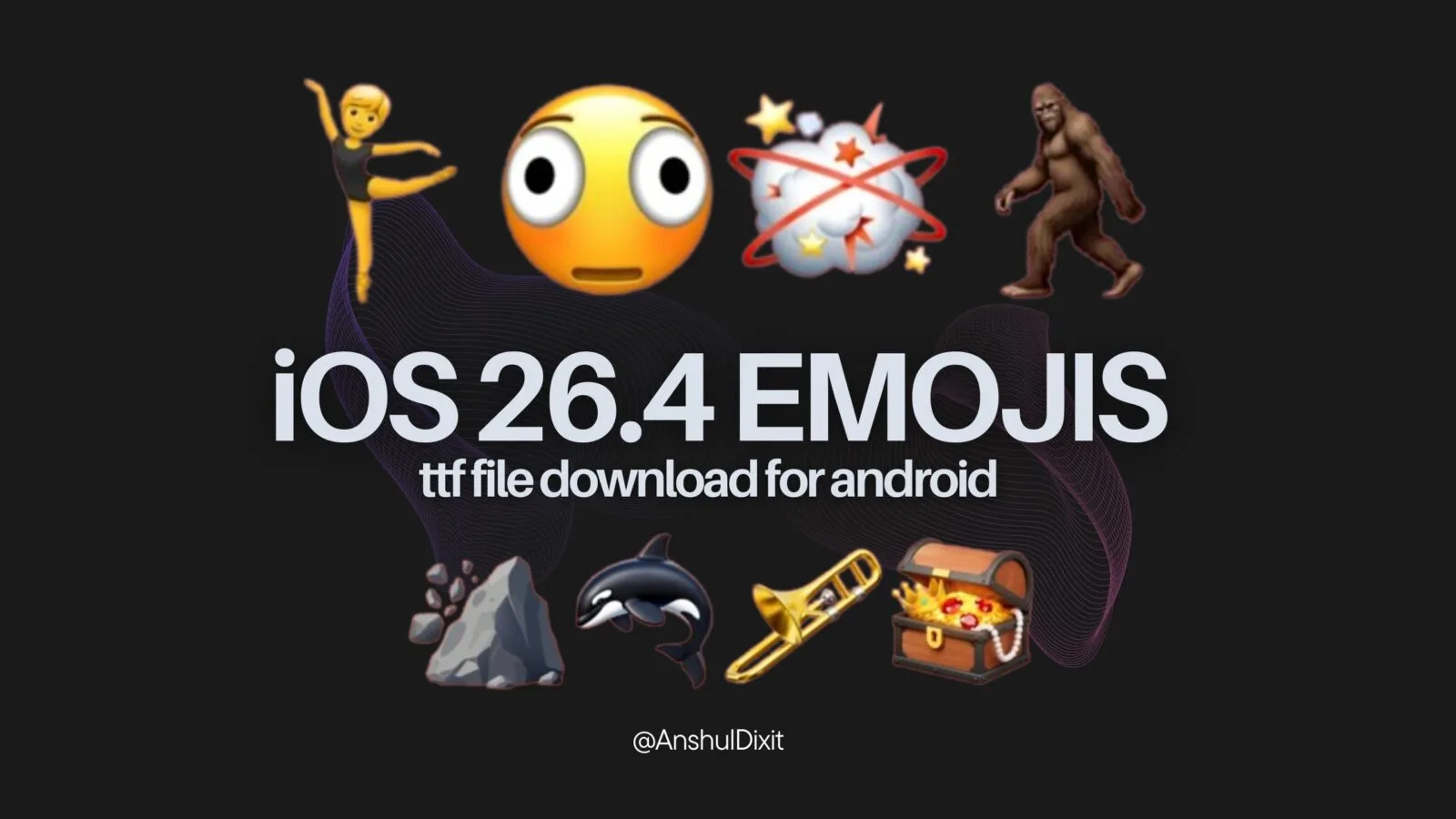
Apple recently gave a preview of its new emojis in iOS 26.4 beta 4, and this update brings some fun and interesting additions to the keyboard. Here are the eight new emojis you can expect:
- Distorted Face – for those confusing or awkward moments
- Fight Cloud – just like the cartoon-style fighting scenes
- 🧑🩰 Ballet Dancer – now available in more skin tone options
- Orca – also known as a killer whale
- Hairy Creature – inspired by Bigfoot-like stories
- Trombone – a new musical emoji
- Landslide – showing natural disasters or sudden changes
- Treasure Chest – perfect for hidden things or surprises
Along with these new emojis, Apple has also slightly updated 🤼 People Wrestling and 👯 People With Bunny Ears. These changes help match the new set of 150 skin tone combinations, making emojis more inclusive for everyone.

Overall, this update adds a mix of fun, expression, and better representation to the emoji collection.
3. How to Get iOS 26.4 Emojis on Android
If you are wondering how to get iOS 26.4 emojis on Android, the easiest and most effective method is by using a TTF emoji font file.
This method replaces your system emoji font, which means iOS emojis will appear in apps like WhatsApp, Instagram, Telegram, and more.
Copy paste emojis – 🧑🩰
Follow these steps carefully:
Steps to apply emojis
- Download the iOS 26.4 emoji TTF file from the link given below
- Install the zFont app on your device
- Open zFont and go to the Local Files section
- Select the downloaded TTF file
- Choose your device method
Samsung users can use Backup and Restore
Xiaomi users can use Theme Store
Realme and Oppo users can use Theme Engine - Apply the font and restart your device
After restarting your phone, the new emojis will be visible across most apps.
4. iOS 26.4 Emoji TTF File Download
If you are specifically looking for the iOS 26.4 emoji TTF file download, you can use the links below.
Download links
iOS 26.4 emojis TTF file – The iOS 26.4 emojis TTF file lets you use the latest Apple emojis on unsupported devices with ease. It’s a simple way to upgrade your emoji style and enjoy the newest designs anywhere.
and iOS 26.4 emojis TTF file is provided in a ZIP file. After downloading, you need to extract it to access and use the file.
Make sure your device supports custom fonts. If the emojis do not apply on the first try, repeat the process using the correct method for your phone.
5. Best Keyboard Setup for iOS Emojis on Android
Many users install separate keyboard apps to get an iOS like experience, but most of those apps are not reliable. They often feel slow and miss important features.
From my experience, the best option is to use Gboard. It provides a smooth typing experience with accurate autocorrect, emoji suggestions, voice typing, and built in translation.
Smart method
- Apply the iOS 26.4 emoji TTF file using the steps above
- Set Gboard as your default keyboard
- Start typing and your emojis will automatically appear in iOS style
This setup gives you both performance and the visual style of iOS emojis.
6. Final Thoughts
If you were searching for iOS 26.4 emojis download or trying to understand how to get iOS 26.4 emojis on Android, this method is one of the simplest and most effective solutions available.
In my experience, once you apply the emoji font correctly, it works smoothly across most apps and improves the overall look of your conversations.
You do not need to switch devices just for better emojis. With the right method, you can enjoy the same experience on Android.
If you face any issues, you can always reach out through my content. I try to help as much as possible.